

KalaSudha Composer: The First Release Is Open for Testing
KalaSudha Composer's first release is live: a compositions library, auto-saving drafts, playback, printing, and shareable links. Open it at /compose and tell us what to fix.

KalaSudha Composer is KalaSudha's browser notation editor for Hindustani classical music: it writes Bhatkhande-style sargam notation online in eight Indian scripts, Bengali and Gujarati among them, with the taal beneath every beat. Its first release is open for testing. Earlier this year, we shared a first look at the editor. Since then, we rebuilt large parts of it and added the pieces you need to keep and use your work: a place to store compositions, drafts that save themselves, playback, printing, and stable links you can share. It comes with the Sadhana digital tools subscription: sign in and open /compose to start writing.
A built-in walkthrough to get you started
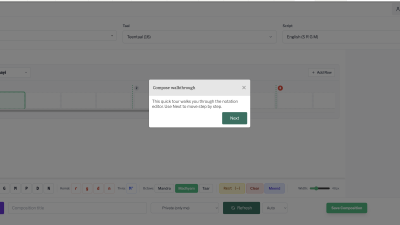
Open the editor for the first time, and the Compose walkthrough opens on its own. Click Next to move through it step by step. It points out each part of the screen: the raga, taal, and script selectors at the top, and the swara keyboard along the bottom. Then come the controls for octave, meend, note density, and beat width, and the Save Composition button. By the last step, you have seen the whole editor without reaching for a manual.
A home for your compositions
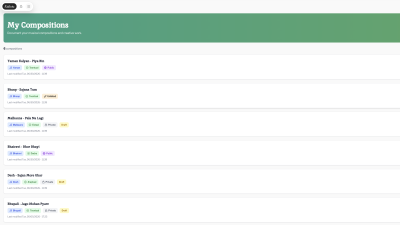
The preview let you write a bandish but gave you nowhere to keep it. Now your My Compositions page lists everything you have written, with the raga, taal, visibility, and the date you last touched it on each card. Filter by raga or taal, search by title, narrow by visibility, or jump to a date range. From the same page you open, view, print, or delete a piece.
Drafts that save themselves
Close a tab by mistake, and you should not lose an hour of notation. The editor syncs your work to the server while you write. You choose how it behaves: off when you want full control, automatic as you go, or a steady save every thirty seconds. Come back later, and your draft is where you left it.
Hear what you wrote
Press play and the editor sounds out your composition beat by beat, marking each note as it goes. Pick the voice that suits the piece: harmonium, piano, guitar, sitar, flute, or violin. Treat it as a sketch, enough to catch a wrong note or to test how a phrase sits in the taal. In this release the playback is rough, and we say so plainly.
Print and share
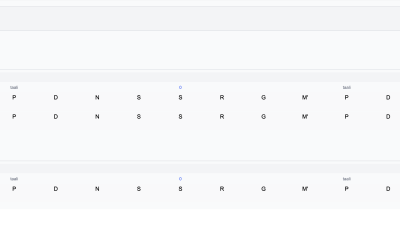
Every composition has a clean print view built for paper. Open it, and your browser's print dialogue gives you a PDF to hand to a student or carry to a lesson. For online sharing, each piece has its own stable link. Keep it private, unlisted so only people with the link can open it, or public for anyone to find. The link stays the same whether the piece is a rough draft or a finished bandish.
The writing surface, in more detail
The editor follows the structure of a bandish. You work in sections: Sthayi, Antara, Sanchari, and Abhog. Inside each, you add rows and fill beats from a swara keyboard, set the octave for any note, and write lyrics under the line. Mark a meend across the notes it spans. Set how many notes sit in a beat, widen or tighten the beat spacing, and show the theka when you want the rhythm in front of you. Notes display in eight Indian scripts, so you write in the one you read fastest.
Start from a sample
A blank grid is a hard place to begin. Click Load Sample instead, and you start from a real piece you can study, edit, or rework into your own. This release ships with three: Yaman Kalyan - Piya Bin, Bhairav - Jai Jagdish Hare, and Bhupali - Jago Mohan Pyare, a pentatonic raga that suits beginners.
Where this is heading
We did not build Composer as a standalone thing. It belongs to the same effort as our concerts, our artist tours, and the KalaSudha Academy. Our courses take shape with Pandit Debasis Chakroborty and the maestros we are proud to call partners. The bandish a guru hands you in a lesson is exactly what Composer is for: carry it in, study it, annotate it, and live with it between sessions. That is the loop Composer is built for.
Help us make it stable
This is a first release, and your usage is the test. Write the bandish you teach. Push it across scripts, long compositions, and awkward talas, the things that tend to break software. When something goes wrong, or when you wish it did something it does not, write to us at [email protected] or through the contact page. Tell us what you were doing, what you expected, and what happened. Requests for new features are as welcome as bug reports.
Open /compose, write something, and tell us how it goes. We are in this for the long run, and we would love your ear and your honesty while Composer is still taking shape.

We are the internal engineering core of KalaSudha, managing our dot-com, Indian Classical Network websites, and are focused on building cutting-edge digital architecture for the Indian classical music ecosystem.
