

Create a KalaSudha account
Press Sign Up at the top of any page and fill in your name and email address. Then press Create new account. The account is free, and the email we send lets you set your password.
2 min read Updated November 1, 2026
To create a KalaSudha account, press Sign Up at the top of any page and fill in your name and email address. Then press Create new account. The account is free. We email you a link that confirms your address and lets you set your password.
Fill in the sign-up form
- Press Sign Up at the top of any page. The sign-up form opens under the heading "Create your account".
- Fill in First name, Last name and Email address.
- Tick I agree to the Terms of Service and Privacy Policy, which the form needs before it will go through.
- If you want our newsletter, tick Subscribe to our newsletter for updates on classical arts events and workshops. This box is optional.
- Press Create new account.
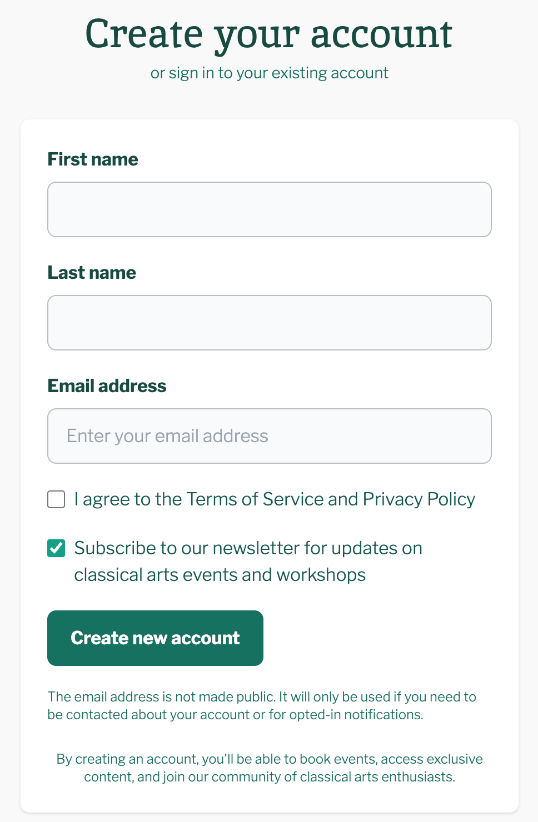
The form has no password box. You choose your password from the email we send.
Confirm your email and set a password
After you press Create new account, the site shows a page headed Check Your Email. It reads: "We've sent a verification link to your registered email."
- Open the email with the subject "Account details for [your name] at KalaSudha".
- Follow the link in it. The link works once and opens a page where you set your password.
- Set your password on the page that opens.
From then on, sign in with your email address or username and that password.
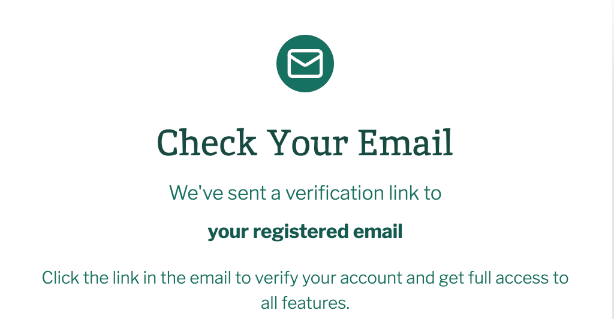
You can confirm later, but the page warns that "some features may be limited until verification is complete." Confirm your email address after signing up covers this step in full.
If this does not work
The email has not arrived
Check your spam or junk folder. On the Check Your Email page, press Resend email, or press Use a different email address if you mistyped it. See also Not receiving emails from us.
You booked tickets before
A guest booking sets up an account under the email you gave at checkout, so you may have one already. Read I booked as a guest. How do I get into my account? or sign in.
For anything else, see Contact us.
Last updated: November 1, 2026
Still need help?
Can't find what you're looking for? Our support team is here for you.
Contact SupportMost enquiries answered within 2-3 business days.